Emulation forums are a special kind of chaos. Someone asks for the best retro handheld console for PS1 and forty-five minutes later they are comparing cooling mods on a device they never intended to buy. This guide exists to skip all of that.
The important thing in 2026 is that PS1 emulation itself is easy. You do not need a $700 handheld PC to run Crash Bandicoot. Once a device clears the basic performance bar, the screen, controls, emulator support, portability, price, and stock situation matter more than another mountain of CPU benchmarks.
Last checked: August 22, 2026. I rechecked current prices, specifications, and stock against the manufacturers’ own stores. Handheld stock changes constantly, so I label sold-out, backordered, and preorder devices instead of pretending every recommendation can be bought this second.
How I ranked these: This is a PS1-first buying guide, not a raw-performance leaderboard. I weighted screen fit, controls, emulator options, price, portability, and current availability. I have not personally benchmarked every handheld on this list, so hardware specifications and stock claims come from official product pages; the DuckStation recommendations come from the emulator’s current documentation and my PS1-focused setup work.
Affiliate disclosure: This post may contain affiliate links. As an Amazon Associate I earn from qualifying purchases at no extra cost to you. Affiliate relationships do not change which devices I recommend.
The Quick Answer
If PS1 is your main goal, buy an Anbernic RG40XX H. It is inexpensive, has a 4-inch 640×480 display that suits classic 4:3 games, includes analog sticks for the PS1 titles that use them, and costs roughly $60 from Anbernic. You do not need more power for normal PS1 emulation.
If you specifically want standalone DuckStation, high internal resolutions, PGXP, and a larger OLED screen, the AYN Odin 2 Portal is the premium sweet spot. The hardware is massive overkill for PS1, but that overkill buys you a much nicer screen and room to emulate newer systems later.
Best PS1 Handhelds in 2026 Compared
| Pick | Handheld | Screen | Standalone DuckStation? | Price / Status |
|---|---|---|---|---|
| Best PS1-only value | Anbernic RG40XX H | 4.0″ 640×480 IPS | No | From about $62.66; China stock available when checked |
| Best big-screen Android | AYN Odin 2 Portal | 7″ 1080p AMOLED | Yes | From $259 sale price; some configurations backordered |
| Best compact Android | Retroid Pocket 6 | 5.5″ 1080p 120Hz AMOLED | Yes | From $244; sold out when checked |
| Premium / future pick | AYN Odin 3 | 6″ 120Hz OLED | Yes | From $349; Batch 8 preorder |
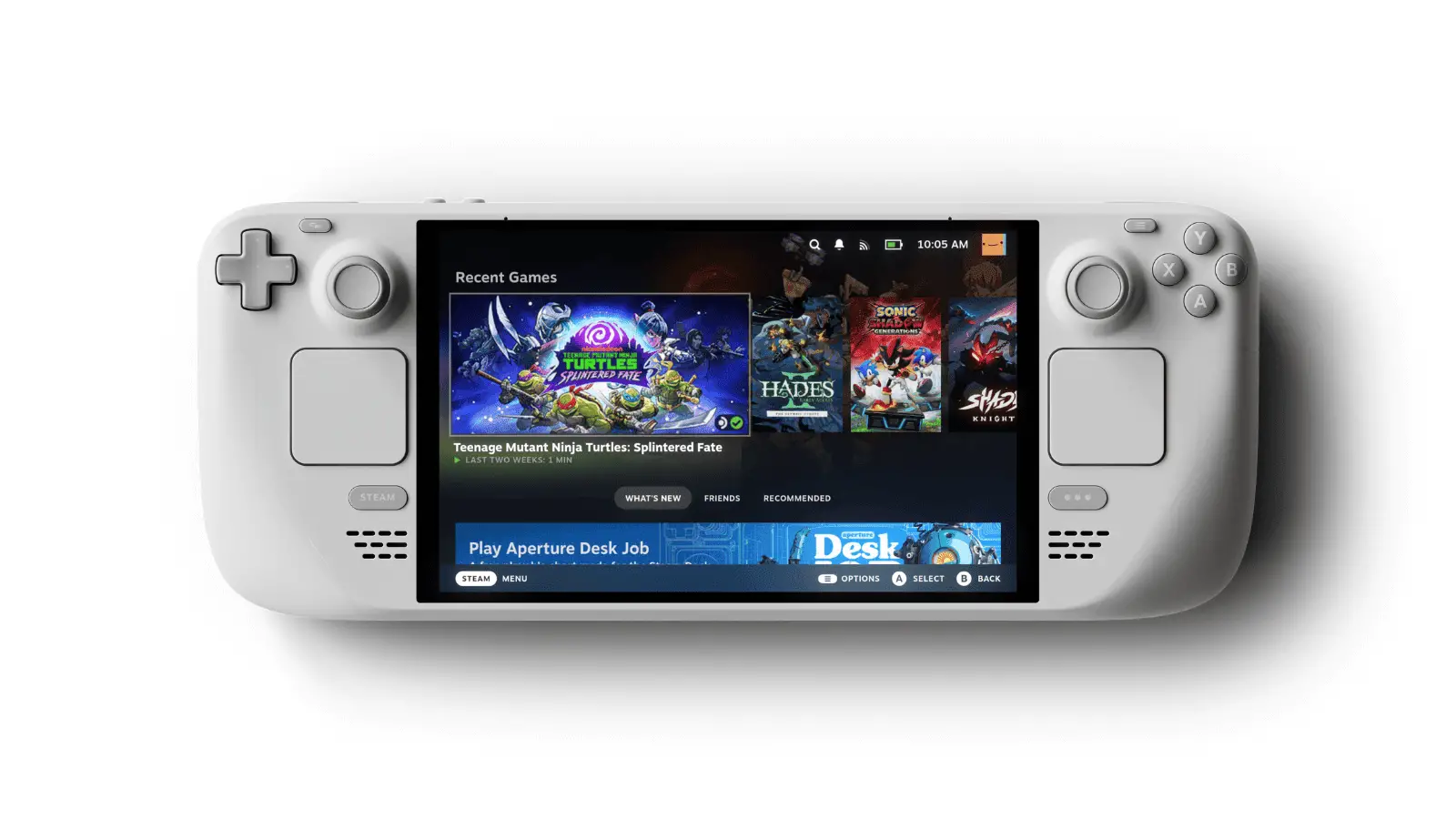
| Best handheld PC | Steam Deck OLED | 7.4″ 1280×800 HDR OLED | Desktop version | From $789; shipping now |
What Actually Matters for PS1 Handhelds
Screen shape matters more than most spec sheets admit. Most PS1 games were designed around 4:3 CRT displays. A 4:3 handheld fills its panel naturally, while a 16:9 OLED gives you black bars at the sides unless you use a widescreen hack. Bigger widescreen devices can still produce a larger 4:3 image overall, but you should know what you are paying for.
Analog sticks are useful, not universally required. A lot of the PS1 library was designed around the original digital controller. Games such as Ape Escape genuinely require DualShock-style analog controls, while many earlier games are perfectly happy on a D-pad. For a PS1-focused handheld, I care about both.
Emulator choice changes the experience. Cheap Linux handhelds usually run PS1 through RetroArch cores and are excellent for straightforward emulation. Android devices can run standalone DuckStation, which gives you easy access to higher internal resolutions, PGXP geometry correction, per-game settings, rewind, and other modern features.
More power stops mattering surprisingly early. Once PS1 is running full speed, buying a faster chip mainly gives you higher rendering resolutions and access to newer systems. That can be worthwhile, but it is no longer a PS1 purchase. It is a broader emulation purchase wearing a Crash Bandicoot hat.
Best PS1-Only Value: Anbernic RG40XX H
The Anbernic RG40XX H is the device I would start with if somebody told me, “I mainly want PS1 and I do not want to spend stupid money.”
- 4.0-inch 640×480 IPS display
- Allwinner H700 quad-core CPU
- 1GB RAM
- Linux 64-bit
- Dual analog sticks
- Wi-Fi and Bluetooth
- Current official price: about $62.66 for a 64GB model from China when checked
The 640×480 4:3 panel is the star. Many PS1 games spend most of their lives in low-resolution 4:3 output, so a screen like this uses its space efficiently without the side bars of a widescreen handheld. The H700 is already enough for PS1, which means you are buying the form factor rather than paying for performance the console does not need.
The tradeoff is software. This is a Linux retro handheld, not an Android DuckStation machine. If your priority is PGXP, aggressive internal-resolution scaling, or experimenting with the standalone DuckStation frontend, move up to Android. If your priority is “I want Crash Team Racing in my bag for around sixty dollars,” this is the smarter answer.
What About the RG35XX H?
The RG35XX H from the original version of this guide is still good. It uses the same H700 family and a 3.5-inch 640×480 IPS screen. Anbernic was listing the basic model around the mid-$50 range, although some U.S. variants were sold out when I checked. At only a small price difference, I prefer the RG40XX H’s larger 4-inch screen for PS1.
Best Big-Screen Android Pick: AYN Odin 2 Portal
If you want PS1 to look polished rather than period-correct, the AYN Odin 2 Portal is the Android upgrade path I like most.
- 7-inch 1080p AMOLED display
- Snapdragon 8 Gen 2
- 8,000mAh battery
- Android 13
- Hall-effect sticks
- Current official price: from $259 on sale
For PS1, the Snapdragon 8 Gen 2 is absurd. That is not a criticism. It means you can raise internal resolution, use PGXP, add shaders, and still have enough performance left over for systems far beyond the original PlayStation.
The 7-inch AMOLED is the real reason to spend the money. A 4:3 PS1 image will not fill the entire 16:9 panel, but it is still physically large. Games like Crash Bandicoot also benefit from cleaner high-resolution rendering, while slower games such as Silent Hill and Metal Gear Solid benefit from the larger screen and OLED contrast.
Stock warning: AYN’s store showed the Base/Black configuration as backordered when I checked, even though other store pages still listed the Portal as a current product. Treat availability as configuration-dependent rather than assuming every color and model is ready to ship.
Best Compact Android Pick: Retroid Pocket 6
The Retroid Pocket 6 is the hardware successor to the Retroid Pocket 5 that originally topped this guide.
- 5.5-inch 1080p AMOLED at 120Hz
- Snapdragon 8 Gen 2
- Adreno 740 GPU
- 8GB or 12GB LPDDR5X
- 128GB UFS 3.1 storage + microSD
- 6,000mAh battery
- Analog triggers and Hall sticks
- Official price: from $244
For PS1 it is, again, ludicrously fast. The reason to buy it is that it stays more compact than the Odin Portal while still giving you standalone DuckStation, a sharp OLED, and enough hardware for much heavier emulation.
The problem is simple: Retroid listed the Pocket 6 as sold out when I checked. I would keep it on the shortlist, not pretend it is a buy-now recommendation.
The older Retroid Pocket 5 still makes sense if you find it near its $209 official-store price or lower. Its Snapdragon 865 and 5.5-inch 1080p AMOLED are already far beyond what PS1 needs. I would not pay an inflated price simply because the Pocket 6 is unavailable.
Premium Watchlist: AYN Odin 3
The AYN Odin 3 is interesting, but I would not call a preorder the “best current handheld” when readers are trying to buy something today.
- 6-inch 120Hz OLED
- Qualcomm Dragonwing Q8
- Android 15
- 8,000mAh battery
- 390g weight
- Starts at $349
AYN was taking Batch 8 preorders with August shipping listed when I checked. It is a far more interesting purchase for PS2, GameCube, Android gaming, and newer emulation than it is for PS1. For this article, that keeps it on the watchlist instead of above devices that cost a fraction as much.
Best Handheld PC: Steam Deck OLED
The Steam Deck OLED is still a fantastic handheld PC and a very silly thing to buy only for PlayStation 1.
Valve currently lists the 512GB OLED at $789 and the 1TB version at $949. The 512GB model includes a 7.4-inch 1280×800 HDR OLED display up to 90Hz, 16GB of LPDDR5, a 50Wh battery, and SteamOS.
DuckStation runs comfortably on it, and the wider PC-emulation ecosystem is excellent. But if your library stops at PS1, you are paying hundreds of dollars for capabilities you will never touch.
Buy the Deck because you also want your Steam library, PC ports, heavier emulation, mods, docking, and the flexibility of a handheld computer. PS1 is a bonus, not the reason the price makes sense.
What About the Legion Go S and Other Handheld PCs?
The Legion Go S can run Windows 11 or SteamOS depending on configuration and uses an 8-inch 1920×1200 120Hz display. It is more than capable of PS1 emulation. So are essentially all current handheld PCs.
I no longer think they belong in the main PS1 recommendation ladder. Once you are shopping for a full handheld PC, the decision is about PC games, ergonomics, battery, operating system, and price. PS1 emulation stopped being the deciding factor several hundred dollars ago.
Why DuckStation Still Matters
For Android and handheld-PC picks, DuckStation is still the PS1 emulator I build around. The current project supports hardware rendering through Vulkan and other APIs, internal-resolution upscaling, texture filtering, PGXP geometry and texture correction, save states, rewind, runahead, per-game settings, automatic game scanning, and more.
The Android build is still distributed through Google Play. DuckStation’s own documentation says 64-bit ARM is preferred, which is exactly what the modern Android handhelds above provide.
Legal note: DuckStation does not include a PlayStation BIOS. The project’s documentation says to dump a BIOS image from your own console. Game disc images are copyrighted too, and the rules around personal backups vary by jurisdiction, so use files you are legally entitled to use rather than all-in-one ROM packs from random websites.
If you are installing DuckStation for the first time, use my DuckStation setup guide. If you already have it running, my DuckStation settings guide is the better place for the full graphics menu. Keeping those topics separate makes this page a stronger buying guide instead of two articles welded together.
One Accessory Worth Buying: A Reliable microSD Card
Cheap bundled microSD cards have a poor reputation in the retro-handheld community, and this is one place I would rather be boring than clever. PS1 games do not need an exotic high-speed card. They need storage you trust with your saves.
I use a Samsung EVO Select microSD card. Buy the capacity that fits your library and keep backups of saves you actually care about.
Simple DuckStation Settings for a Handheld
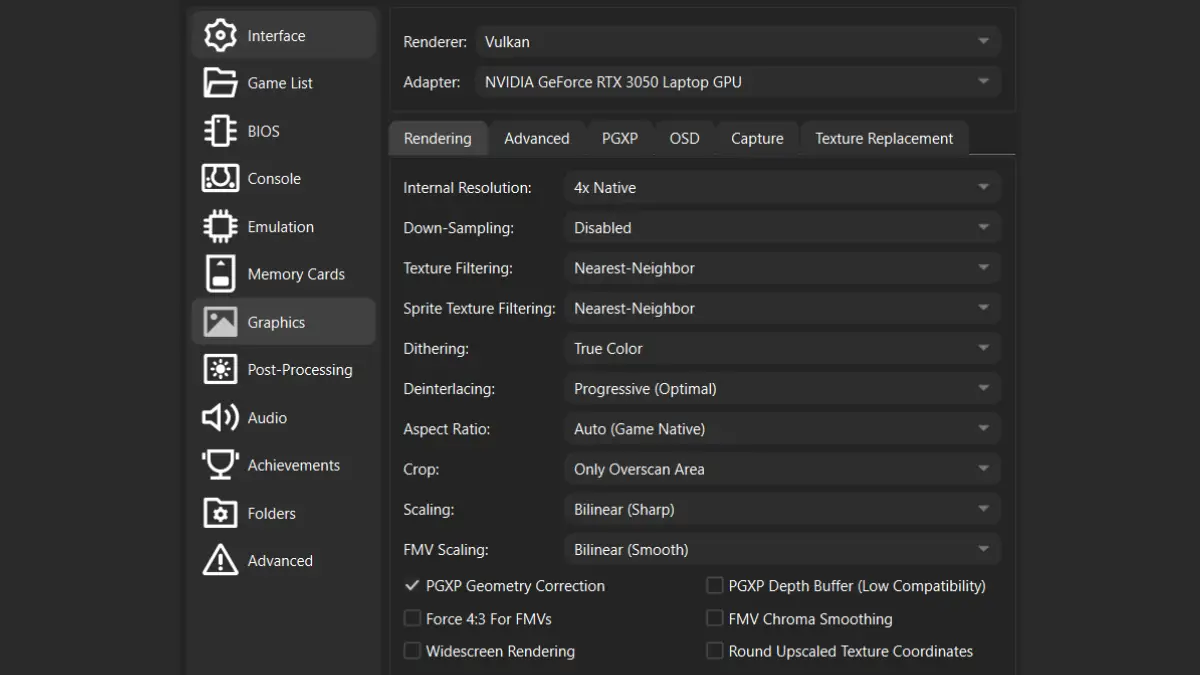
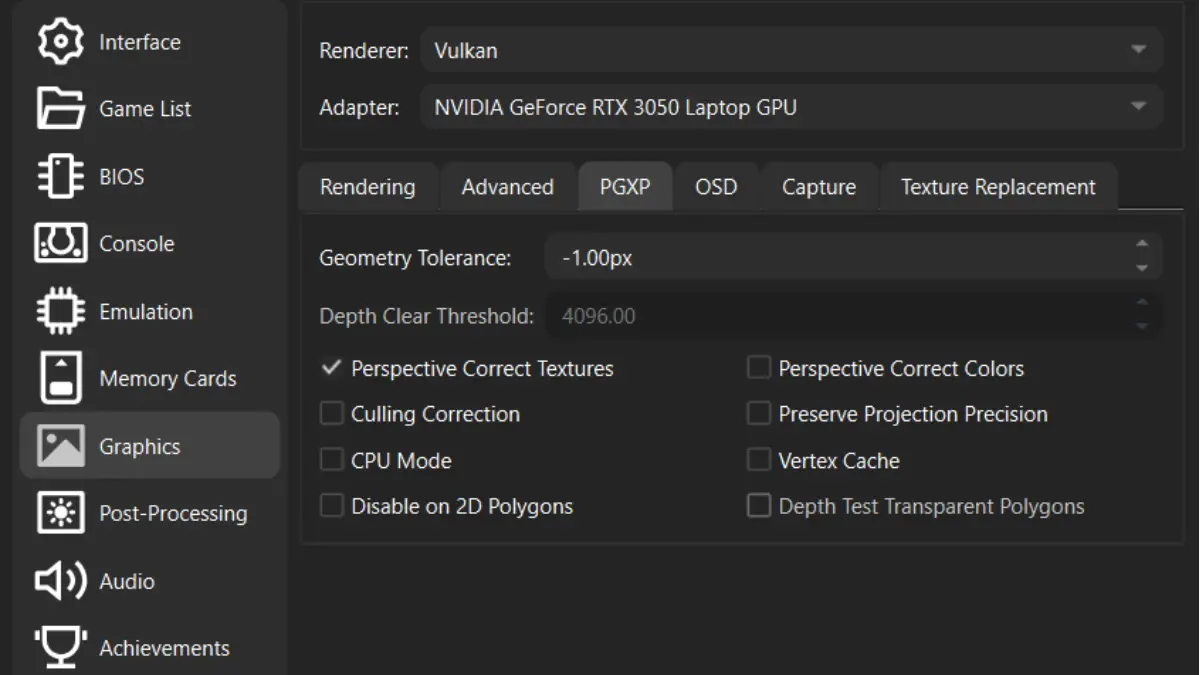
I would start with DuckStation’s defaults rather than copy a giant preset from somebody else’s hardware. Then change only what you actually want:
- Renderer: Automatic first; Vulkan is a good hardware-rendering option on compatible Android devices.
- Internal resolution: raise it until the image is sharp enough for your screen without hurting performance.
- Aspect ratio: game native / 4:3 for normal PS1 presentation.
- Texture filtering: Nearest Neighbor if you want to preserve the original texture character.
- PGXP: optional; enable geometry correction if you dislike PS1 wobble, and turn it off per game if it causes visual problems.
- Widescreen hacks: off unless you specifically want them and have tested the game.
I also compared DuckStation CRT filters if you want the opposite approach and would rather make a modern OLED feel closer to an old television.
Best Retro Handheld for PS1 FAQ
What is the best retro handheld for PS1 in 2026?
For PS1 alone, my best-value pick is the Anbernic RG40XX H because its 4-inch 640×480 screen fits classic 4:3 games well and the hardware already has enough performance for PS1. If you want standalone DuckStation, high-resolution rendering, and a large OLED, the AYN Odin 2 Portal is the stronger premium choice.
Do I need an expensive handheld for PS1 emulation?
No. PS1 emulation is mature and inexpensive hardware can run it well. Spending more mainly buys a better screen, Android or PC software, higher rendering resolutions, and performance for newer consoles.
Is a 4:3 screen better for PS1?
For most original PS1 games, yes. They were designed for 4:3 televisions, so a 4:3 handheld uses more of its display without side bars. A larger 16:9 OLED can still provide a bigger image overall, so screen size and aspect ratio both matter.
Does DuckStation work on Android handhelds?
Yes. DuckStation still provides an Android build through Google Play, and 64-bit ARM devices are preferred. Modern Retroid and AYN Android handhelds have far more performance than normal PS1 emulation requires.
Do I need analog sticks for PS1?
Not for every game. Much of the PS1 library supports the original digital controller, but later DualShock games can use analog movement and Ape Escape requires analog sticks. If you want broad compatibility, buy a handheld with both a good D-pad and dual analog controls.
Should I buy a Steam Deck just for PS1?
No. The Steam Deck OLED is excellent, but at a current starting price of $789 it makes sense only if you also want PC games and heavier emulation. PS1 alone does not justify the hardware.
The Short Version
PS1 only: Anbernic RG40XX H. Cheap, 4:3, portable, and powerful enough.
PS1 with DuckStation enhancements: AYN Odin 2 Portal. Bigger OLED, standalone Android DuckStation, and far more performance than the system needs.
Compact OLED: Retroid Pocket 6. Excellent hardware, but wait for stock instead of paying reseller prices.
The big lesson is that PS1 stopped being a performance problem years ago. Pick the screen and form factor you actually want, spend only as much as your wider game library justifies, and then stop shopping long enough to play something. If you are still deciding how you want to play the system in general, my PS1 beginner guide compares handheld emulation with original hardware and other modern options.