You do not need a monster GPU to build a great retro gaming PC. In 2026, the harder part is buying the right parts without getting mugged by the memory market on the way to checkout.
A desktop still gives you one of the most flexible ways to play older games. One machine can cover PS1, Dreamcast, PSP, GameCube, Wii, PS2, arcade games, and plenty beyond that, while also giving you better controller support, higher internal resolutions, shaders, texture packs, save states, and room to upgrade later.
If you are deciding between a PC and something smaller, I also have a retro handheld guide for 2026. Handhelds win on portability. A desktop wins when you want maximum flexibility and do not mind giving it a permanent home.
Last checked: August 20, 2026. PC hardware pricing is unusually volatile right now, especially RAM and SSDs. Treat every total below as a price target, not a promise.
Best Retro Gaming PC Builds in 2026: Quick Picks
| Build | Price Target | Best For |
|---|---|---|
| Budget Hybrid | About $550-$650 | PS1, N64, Dreamcast, PSP, lighter PS2 |
| 8700G APU Build | About $1,000-$1,100 | Quiet 1080p-class PS2, GameCube and Wii emulation |
| Mid-Range Build | About $1,550-$1,700 | 1440p emulation, Wii U, stronger PS3 baseline, texture packs |
| High-End Build | About $2,650-$2,850+ | Heavy PS3 workloads, high-resolution enhancements and modern PC gaming |
If you only want PS1, do not spend four figures because somebody on a forum said you need sixteen CPU cores and a graphics card that requires its own mortgage. My guide to playing PS1 games in 2026 explains the easier routes, and my DuckStation settings guide shows how little hardware you actually need for a good PS1 experience.
Why PC Parts Are So Expensive in 2026
I am calling it the Memory Meltdown because apparently PC building needed another dramatic era.
The underlying problem is real. Memory suppliers have been shifting capacity toward server and AI products, including HBM, while consumer DRAM and NAND supply has tightened. TrendForce reported enormous contract-price increases through the first half of 2026, then projected conventional DRAM prices to keep rising in the third quarter, just at a slower rate. That is why RAM and SSD prices look completely detached from what they cost a year ago.
I would not repeat a blanket claim that every RAM kit went up 300 or 400 percent, because the increase depends heavily on capacity, speed, brand, and when you compare it against. The useful takeaway is simpler: memory is expensive, SSDs are expensive, and both can wreck a budget build faster than the CPU can.
Price reality: In early August 2026, Tom’s Hardware was tracking 32GB DDR5-6000 kits around $389 at the low end, while 16GB DDR4-3200 kits were around $94. A 1TB NVMe drive around $140 is now a reasonable target, and many decent 2TB drives are closer to $250-$300 than the old $100 bargain-bin days.
That also means these builds are deliberately not obsessed with Gen5 SSDs, enormous memory kits, or flashy motherboards. Emulators care far more about CPU performance, GPU capability at your chosen internal resolution, and whether the emulator itself likes the game you are trying to run.
Tier 1: Budget Hybrid Retro Gaming PC (~$550-$650)
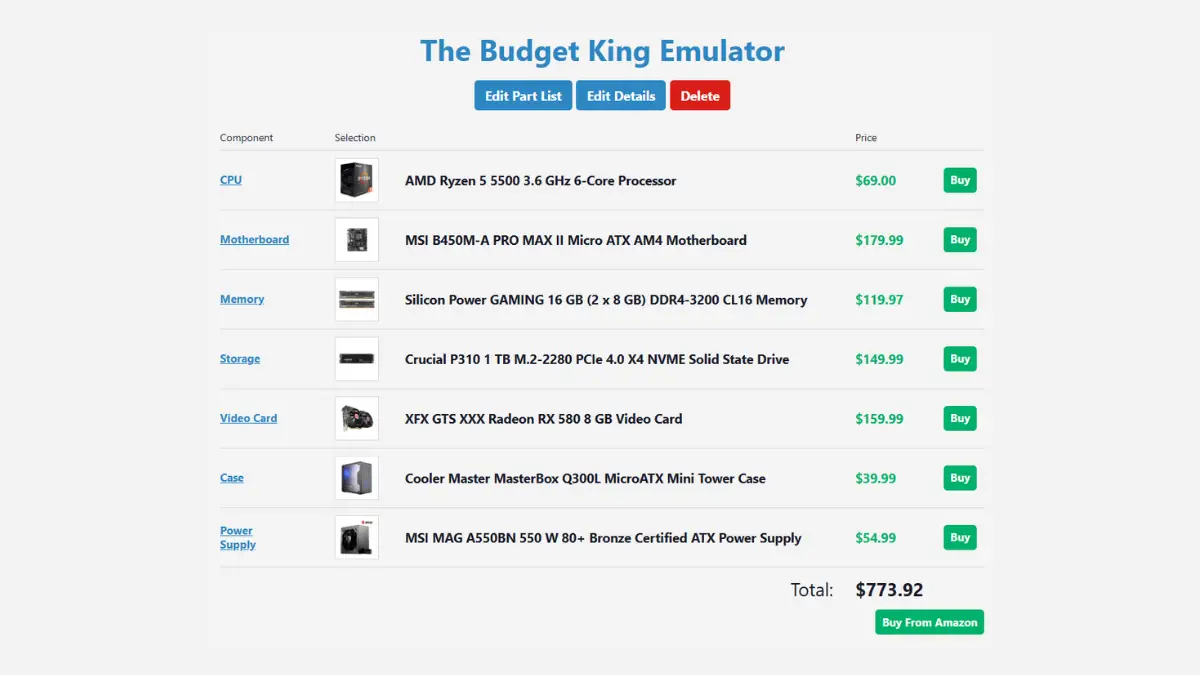
Best for: PS1, N64, Dreamcast, PSP, arcade emulation, and a large chunk of the PS2 library at modest internal resolutions.
Strategy: Buy the CPU, storage and power supply new. Hunt for the motherboard and GPU used if the deal is actually good.
| Component | Choice | 2026 Target |
|---|---|---|
| CPU | AMD Ryzen 5 5500 | About $95-$105 |
| Motherboard | Used B450 or B550 | About $60-$90 |
| GPU | Used Radeon RX 580 8GB | About $65-$100 |
| RAM | 16GB DDR4-3200 | About $90-$110 |
| Storage | 1TB NVMe SSD | About $130-$160 |
| PSU | 500-550W 80+ Bronze | About $50-$70 |
| Case | Budget airflow case | About $35-$50 |
The Ryzen 5 5500 is still a reasonable cheap emulation CPU. It is a 6-core, 12-thread Zen 3 chip on AM4, supports DDR4-3200, and AMD still lists B450 among its supported chipsets. The catch is that it only supports PCIe 3.0 and has no integrated graphics, so you do need a GPU.
The RX 580 is old enough to have memories of dial-up internet, but AMD still had a Windows 11 driver available for it in May 2026. At the right used price, it remains useful for lighter emulation and resolution scaling. I would not pay collector prices for one. If a newer used GPU lands within shouting distance, take the newer card.
What I would expect: PS1 and N64 are easy work. Dreamcast and PSP should be comfortable. PS2 is where I stop making blanket promises. PCSX2’s own requirements show that harder games can need substantially more CPU and GPU headroom than easy ones, so treat 2x PS2 as a target for many games, not a contract signed in blood.
Also, 16GB RAM is not “barely enough” for emulation. PCSX2 lists 16GB even for its heavy tier. More memory is useful if you keep Chrome, Discord, recording software, texture packs and half your digital life open in the background, but the emulator itself is not sitting there demanding 64GB.
Tier 2: The 8700G APU Build (~$1,000-$1,100)
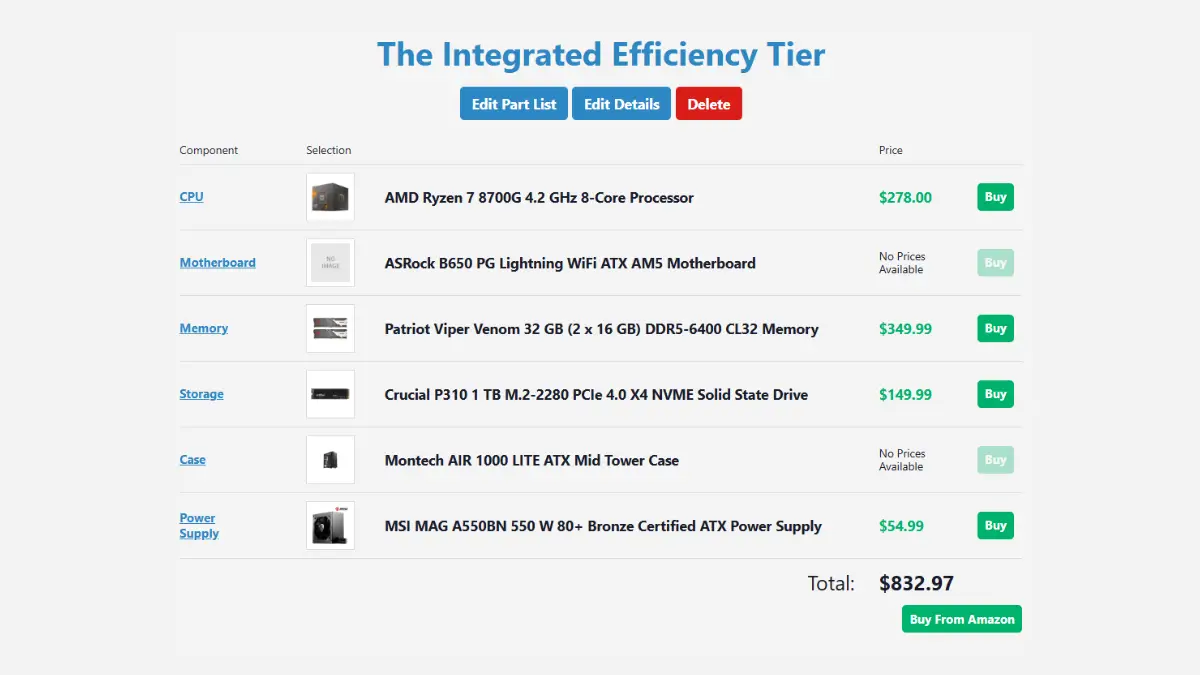
Best for: Someone who wants all-new parts, low noise, low complexity, and strong 1080p-class PS2, GameCube and Wii emulation without installing a separate GPU.
| Component | Choice | 2026 Target |
|---|---|---|
| APU | AMD Ryzen 7 8700G | About $280 |
| Motherboard | B650M | About $120-$150 |
| RAM | 32GB DDR5-6000 CL30/CL36 | About $375-$425 |
| Storage | 1TB NVMe SSD | About $130-$160 |
| PSU | 500-550W 80+ Bronze | About $50-$70 |
| Case | Compact mATX airflow case | About $60-$80 |
The Ryzen 7 8700G has eight Zen 4 CPU cores and Radeon 780M integrated graphics with 12 graphics cores. That combination is the whole point of this build. You get enough CPU for demanding older emulators and a surprisingly capable iGPU without buying a graphics card.
One important correction from my old version: you do not need DDR5-6400 or faster for this machine to make sense. Faster dual-channel memory can help an APU because the iGPU shares system memory, but AMD officially rates the 8700G for DDR5-5200. A good DDR5-6000 CL30 or CL36 kit is a much saner target if the motherboard and EXPO profile are stable.
What I would expect: PS2, GameCube and Wii at 1080p-class settings are sensible targets in a lot of games. Some titles will go higher. Some will find a new and exciting way to remind you that emulation performance is game-specific.
If your main goal is PS1, this is already more machine than you need. Start with my DuckStation setup guide and you will probably discover that the hardware requirement is the least interesting part of the project.
Tier 3: Mid-Range Emulation PC (~$1,550-$1,700)
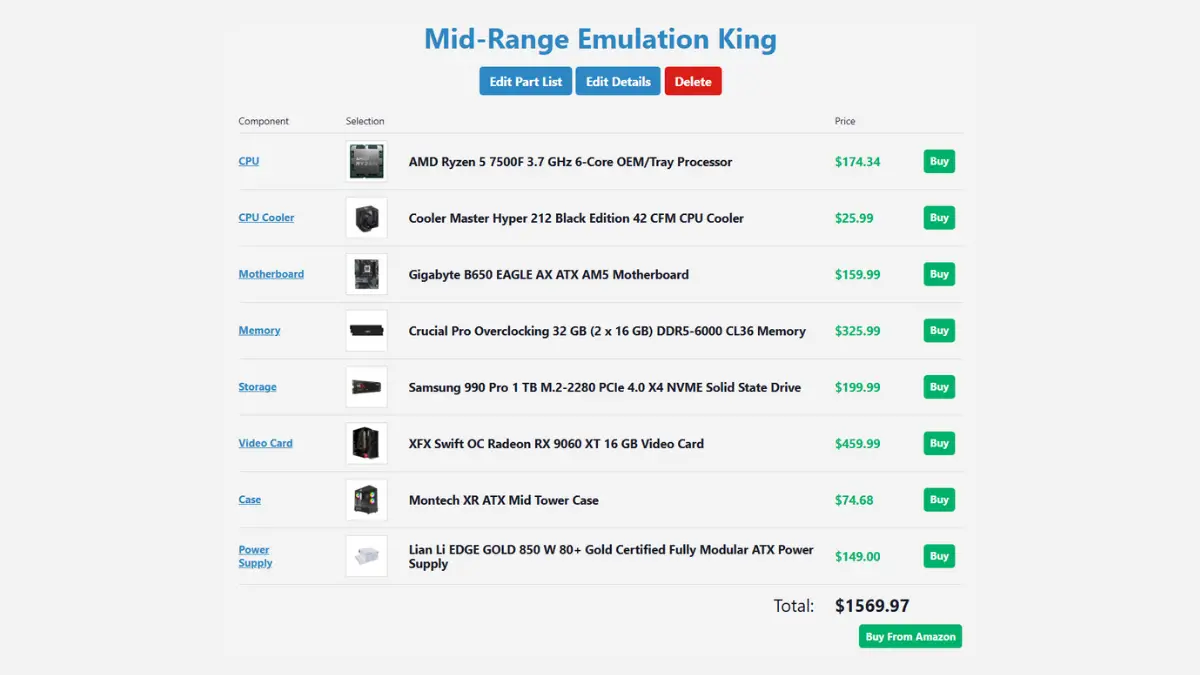
Best for: 1440p Dolphin, Wii U, high-resolution texture packs, heavier PS2 settings, and a stronger baseline for PS3 emulation.
| Component | Choice | 2026 Target |
|---|---|---|
| CPU | AMD Ryzen 5 7500F | About $145-$170 |
| GPU | Radeon RX 9060 XT 16GB | About $470-$520 |
| Motherboard | B650 motherboard | About $140-$170 |
| RAM | 32GB DDR5-6000 CL30/CL36 | About $375-$425 |
| Storage | 2TB NVMe SSD | About $250-$300 |
| PSU | 650W 80+ Gold | About $70-$100 |
| Case | Airflow-focused mATX/ATX case | About $70-$90 |
The Radeon RX 9060 XT 16GB is real, despite the name looking like somebody dropped a zero into a graphics-card generator. AMD lists 16GB of GDDR6, a 128-bit memory interface and up to 140W board power. For emulation, the important part is that you have enough GPU headroom for high internal resolutions, texture packs and heavier rendering paths without immediately running into VRAM pressure.
This tier is also where I stop using “Switch at X resolution” as a buying promise. Current Nintendo emulation is too dependent on the specific emulator, game and compatibility state to treat it like a clean benchmark. Buy this because it is a strong general-purpose gaming and emulation PC, not because one chart told you every game from one console will magically run at the same settings.
PS3 warning: a stronger PC improves RPCS3, but hardware cannot brute-force every compatibility problem. Some games remain limited by emulator behavior, title-specific settings or the game itself. Think of this tier as a much better baseline, not a “PS3 solved forever” button.
Tier 4: High-End Emulation and Modern Gaming PC (~$2,650-$2,850+)
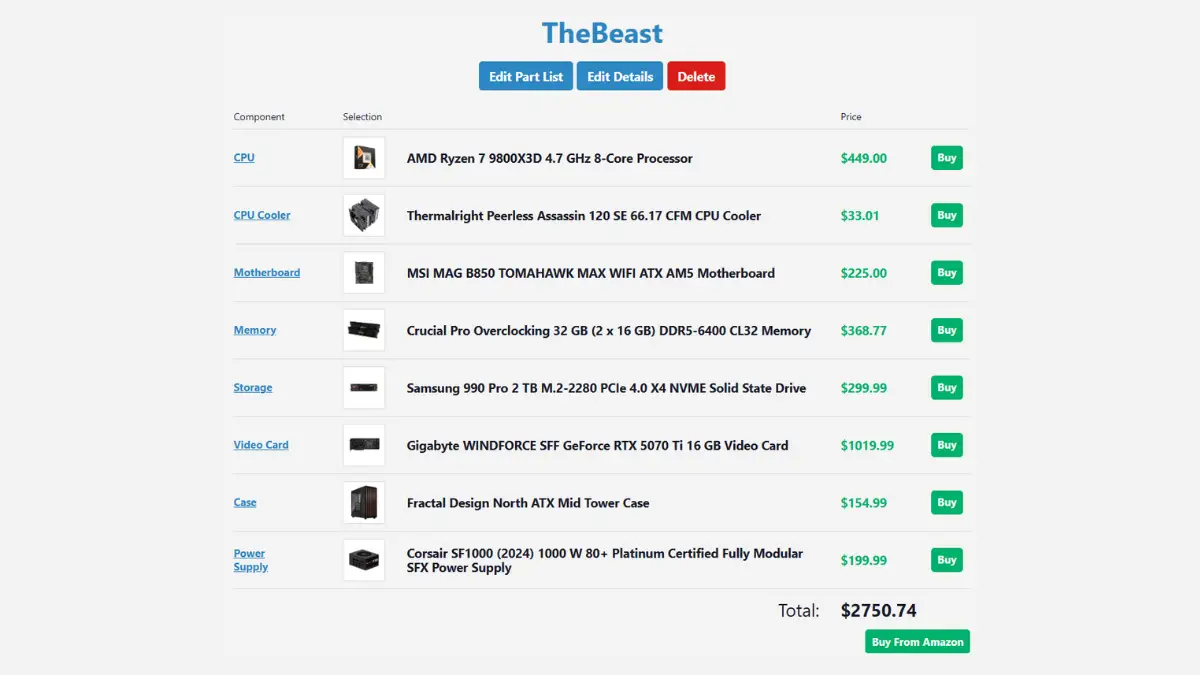
Best for: heavy RPCS3 workloads, very high internal resolutions, texture packs, demanding shaders, modern AAA games, recording and streaming.
Important: this is a high-end gaming PC that also happens to be excellent at emulation. If emulation is your only goal, spend less.
| Component | Choice | 2026 Target |
|---|---|---|
| CPU | AMD Ryzen 7 9800X3D | About $479 |
| CPU cooler | High-end air cooler or 240/280mm AIO | About $80-$120 |
| GPU | GeForce RTX 5070 Ti 16GB | About $970-$1,050 |
| Motherboard | B850 motherboard | About $200-$250 |
| RAM | 32GB DDR5-6000/6400 | About $375-$425 |
| Storage | 2TB Gen4 NVMe SSD | About $250-$320 |
| PSU | 850W ATX 3.1 Gold | About $90-$130 |
| Case | Fractal North or similar airflow case | About $130-$150 |
The Ryzen 7 9800X3D is an 8-core, 16-thread Zen 5 chip with 96MB of L3 cache. AMD does not include a cooler and recommends liquid cooling for optimal performance, which my old parts list forgot to budget for. That little omission becomes less little once you reach checkout.
The RTX 5070 Ti has 16GB of GDDR7. In August 2026, retail models were hovering around $1,000, which is why this build is now closer to $2,700 than $2,400 once you include the memory and storage market. The GPU is complete overkill for PS1, PS2 and GameCube. It makes sense here because this tier is also supposed to be a serious modern gaming machine.
What I would expect: high-end emulation with room for resolution scaling, shaders and texture packs, plus strong modern 1440p and 4K gaming. I would still never promise “every PS3 game at 4K 60 FPS.” Emulator compatibility does not care how expensive your graphics card was.
What Screen Should You Use?
Budget: 24-inch 1080p IPS
The MSI G242L E14 is a real 23.8-inch 1080p IPS monitor with a 144Hz refresh rate and FreeSync. For a Tier 1 or APU build, 1080p is still a perfectly sensible target. Retro games are not going to file a complaint because your monitor has fewer than four million pixels.
Best all-around: 27-inch 1440p IPS
This is the sweet spot for the mid-range build. One correction from my old version: the regular ViewSonic OMNI VX2728J is 1080p, not 1440p. The model I should have named is the VX2728J-2K. The ASUS ROG Strix XG27ACG is another legitimate 27-inch 2560×1440 IPS option and ASUS lists it at 180Hz.
Purist: CRT
A CRT is still the fun option if you want the old games to look physically old instead of digitally impersonating old. But the connection hardware needs one important clarification.
- Reflex Prism: a lag-free digital-to-analog converter for RGB, component and S-Video. It is not a downscaler. Your PC or another device must already output a CRT-compatible signal, or you need a downscaler in front of it.
- GBS-C: a budget scaler that can downscale 480p to 240p with very low lag when used through its analog path. It is powerful for the money, but it is not the one-box answer for every modern HDMI source.
If the screen side of this is the part you care about most, my best way to play PS1 games in 2026 guide goes much deeper into CRTs, scalers and modern displays.
How Much PC Do You Actually Need for Emulation?
For older systems, not much. DuckStation can run PS1 beautifully on hardware far below anything in this article. PCSX2’s own current requirements put a Ryzen 5 5600 and RX 6600 XT in its “heavy” example tier, which is useful perspective before you accidentally build a $2,700 machine to play Digimon World 3.
The reason to spend more is not “retro games require it.” You spend more because you want higher-resolution rendering, heavy texture packs, Wii U and PS3 headroom, recording, modern games, or one computer that handles everything.
If you are building an entire couch setup around the machine, my one-PC retro gaming setup guide covers controllers, TV setup, folders, frontends and the stuff that actually determines whether you use the thing after the first weekend.
Should You Build Now or Wait?
I would not tell everybody to buy immediately, because nobody actually knows exactly where retail pricing goes next. TrendForce still sees tight memory conditions continuing into 2027, but that does not mean every component rises every week forever.
If you already own a usable PC, wait for individual deals. RAM and SSD pricing is ugly enough that patience can save real money. If you have nothing and want to start now, the used AM4 route is still the least painful door into the room.
And if this whole article has made PC building sound exhausting, that is fair. A handheld is simpler. A console is simpler. Sometimes the best retro setup is the thing you can turn on without opening six browser tabs first.
Retro Gaming PC FAQ
What is the best CPU for a retro gaming PC?
It depends on the systems you want to emulate. A Ryzen 5 5500 is plenty for older systems and many PS2 games. The Ryzen 7 8700G is attractive if you want strong integrated graphics. For heavy PS3 emulation and modern gaming, a faster Zen 5 CPU such as the Ryzen 7 9800X3D gives much more headroom, but it is not necessary for normal retro gaming.
Do you need a graphics card for emulation?
Not always. An APU such as the Ryzen 7 8700G can handle a surprisingly broad range of emulators without a dedicated GPU. A graphics card becomes more useful as you raise internal resolution, add texture packs and shaders, or use the PC for modern games too.
Is 16GB of RAM enough for retro gaming?
Yes for the emulators covered by the budget build. PCSX2 lists 16GB even in its heavy requirements tier. I prefer 32GB on a new mid-range build because it gives Windows, multitasking, texture packs and recording software more breathing room, not because PS2 suddenly needs thirty-two gigs to remember where Jak left his hoverboard.
What is the best emulator for PS1 on PC?
DuckStation is my pick in 2026. It gives you high internal resolutions, PGXP geometry correction, save states, rewind, controller support and strong compatibility. If you are starting from zero, use my DuckStation setup guide.
The Short Version
If you want PS1 through Dreamcast, build cheap. If you want PS2 and GameCube without a dedicated GPU, the 8700G is the interesting middle ground. If you want Wii U, heavier PS3 emulation, texture packs and modern PC gaming too, move into the mid-range tier.
The $2,700 machine exists because some people want everything turned on at once. I understand those people. I am also not going to pretend Crash Bandicoot asked for an RTX 5070 Ti.
Whatever you build, emulate legally. Dump your own BIOS files and games from hardware you own, then spend the rest of your evening arguing with yourself about whether 4x resolution still counts as retro.