PS1 games can look incredible in DuckStation. Raise the internal resolution, clean up the polygons, and suddenly a game from 1998 looks suspiciously comfortable on a modern display.
Sometimes that clean look also feels a little wrong. I did not grow up playing these games on a razor-sharp laptop panel. I played them on a CRT television, where scanlines, softness, color blending, and the display itself became part of how the graphics looked.
So I tested six CRT shaders and shader combinations in DuckStation to find the one I would actually leave on for a full game. This is not a laboratory recreation of one specific Sony Trinitron. It is a practical ranking based on readability, image character, and whether the shader eventually disappears into the game instead of demanding attention.
If your emulator is not set up yet, start with my DuckStation setup guide. If you want the broader graphics configuration first, my best DuckStation settings guide explains resolution, PGXP, rendering, and post-processing.
Last checked: August 22, 2026. DuckStation’s current shader files and Post-Processing interface were rechecked. The ranking itself still reflects my original controlled test on DuckStation 0.1-11443 using the same display, games, and default shader settings described below.
CRT-HYLLIAN gave me the dense CRT texture I wanted without making Digimon World or Mega Man X4 too dark, muddy, or distracting. CRT-Lottes came second for its curved-screen look, while NTSC Adaptive + Scanlines ABS was my favorite if the goal was a softer old-TV signal rather than a cleaner CRT-style image.
| Shader | Score | Best For |
|---|---|---|
| CRT-HYLLIAN | 9/10 | Best overall |
| CRT-Lottes | 8/10 | Curved CRT look |
| NTSC Adaptive + Scanlines ABS | 7/10 | Old-TV signal feel |
| Scanlines ABS | 6/10 | Very obvious scanlines |
| CRTLottes2 | 5/10 | Softer CRT presentation |
| CRT-NewPixie | 4/10 | Heavy analog effects |
How I Tested the DuckStation CRT Shaders
Computer: Lenovo Legion Pro 7i
Display: 2560×1600
DuckStation test build: 0.1-11443
Internal resolution: 1x Native
Aspect ratio: 4:3
Shader settings: Defaults unless noted
Primary test game: Digimon World
Secondary 2D test: Mega Man X4
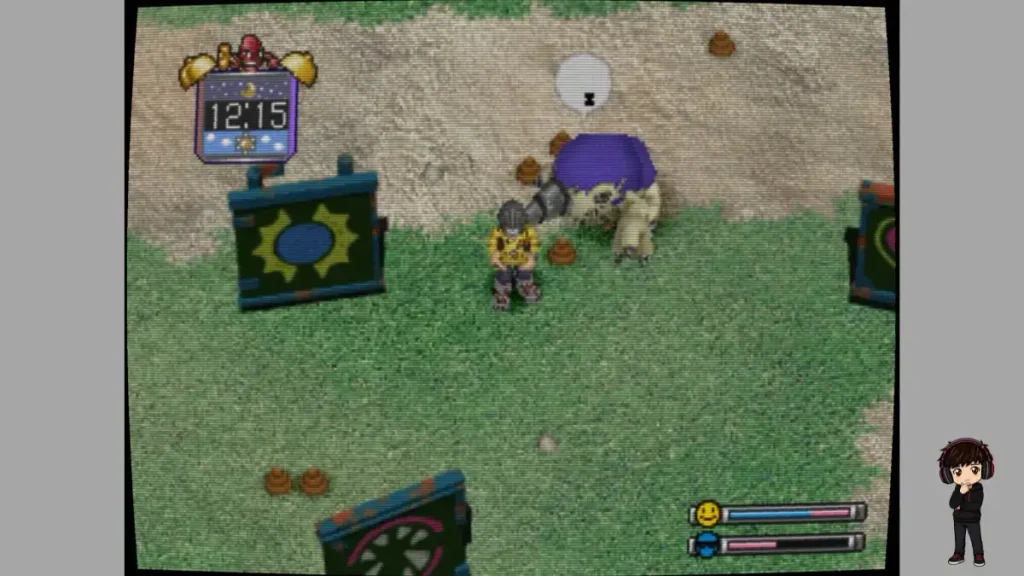
I used Digimon World as the main comparison, loading the same scenes wherever possible and changing only the post-processing shader. I deliberately stayed at 1x Native and 4:3 so higher internal resolution and widescreen rendering would not become extra variables in what was supposed to be a shader test.
I also used the defaults for the ranking. DuckStation exposes adjustable parameters on many of these shaders, including scanline strength, brightness, color, curvature, blur, mask behavior, and more. That means a shader you dislike at default can sometimes be rescued on your display. I wanted to rank the experience most people see immediately after adding it, not the best version I could manufacture after an evening of slider archaeology.
There was never one universal CRT look. Television model, signal type, cable, screen size, brightness, phosphor characteristics, and viewing distance all changed what people saw. So when I call one shader more authentic, I mean authentic to the kind of CRT image I remember, not objectively correct for every television ever built.
1. CRT-HYLLIAN 9/10
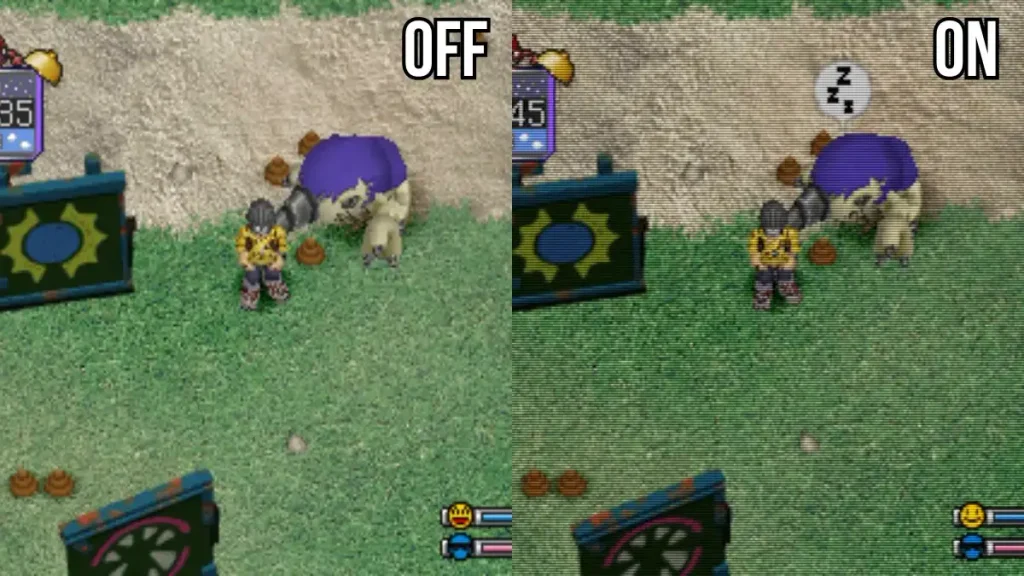
CRT-HYLLIAN was the first filter where I understood why people can lose entire evenings tuning CRT shaders. Its scanlines are dense and obvious, but the game underneath stays readable. Text remained clear, brightness held up, and I never got the smeared feeling that hurt several shaders lower in the ranking.
The part I liked most was the texture it gave the whole image. It reminded me of sitting close to an old television, where the picture never looked perfectly clean but also never looked broken. After a few minutes I stopped studying the shader and started playing, which is exactly what I wanted.
The scanlines are slightly denser than my perfect imaginary setting, so I stopped at 9/10. Everything else about HYLLIAN made it the one I could actually leave enabled for an RPG.
I Tried CRT-HYLLIAN With Mega Man X4 Too
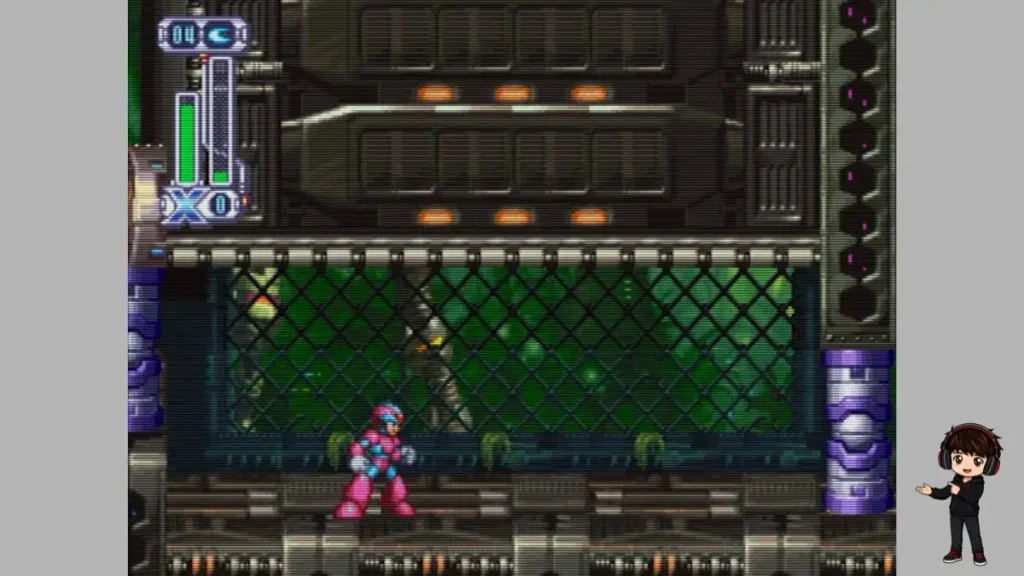
I did not want HYLLIAN winning only because it suited Digimon World’s 3D scenes, so I loaded Mega Man X4. The result held up. Sprites and artwork stayed clear, and the CRT texture did not bury the 2D detail.
That second test settled the ranking for me. Whether the PS1 was pushing polygons or leaning heavily on sprites, HYLLIAN was the shader I kept wanting to play rather than merely inspect.
2. CRT-Lottes 8/10
CRT-Lottes announces itself immediately because the image bends inward. The current shader still exposes separate horizontal and vertical screen-warp controls, so that curved-glass presentation is not an accidental side effect. It is part of what the shader is built to do.
At first I found the curvature awkward on a modern widescreen panel, especially in screenshots. After playing for a while it became surprisingly convincing because the underlying image stayed fairly crisp and bright.
I still prefer HYLLIAN because it disappears faster. Lottes keeps reminding me that I enabled a CRT effect. If curved glass is the memory you are trying to recreate, though, this is the one I would try first.
3. NTSC Adaptive + Scanlines ABS 7/10
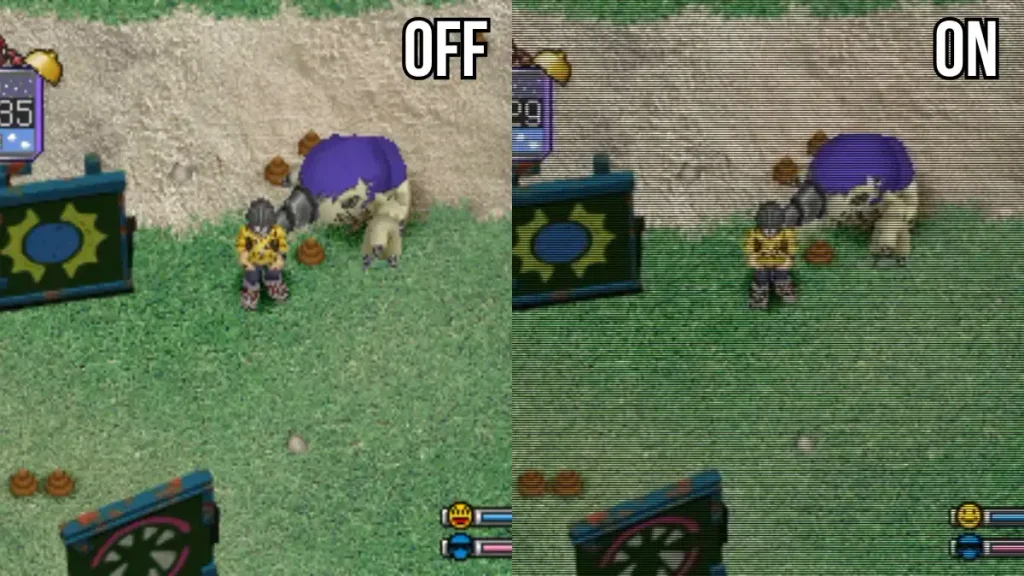
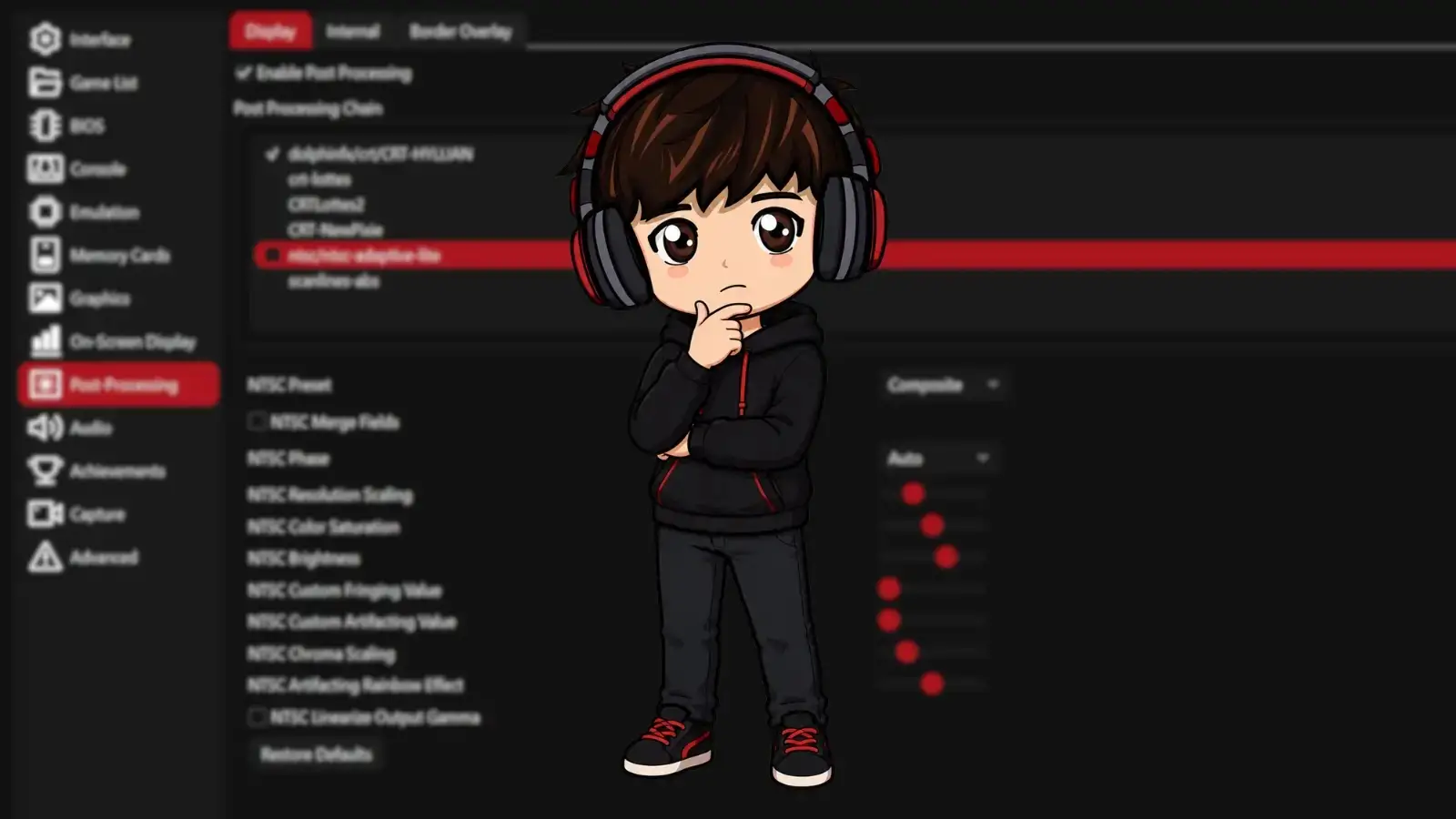
This was the only two-stage chain in the test. DuckStation’s current Post-Processing system still executes shaders sequentially, so stacking NTSC Adaptive before Scanlines ABS remains a valid way to build this look.
The result is softer than HYLLIAN and noticeably less clean. Normally that would be a negative, but here the blur feels connected to the simulated video signal instead of feeling like somebody smeared the screen.
The weakness is the same thing that creates the character: softness. In a menu-heavy game, I would eventually get tired of it. If your target is an old bedroom television rather than a crisp arcade-monitor style image, this is the combination I would try.
4. Scanlines ABS 6/10
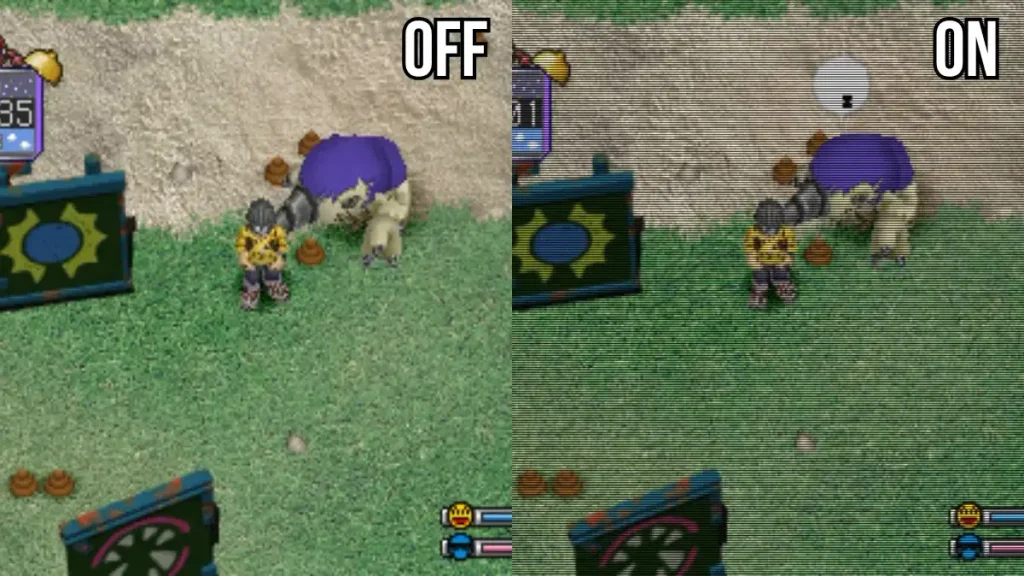
Scanlines ABS does exactly what the name threatens. The current shader still exposes controls for scanline height, amplitude, phase, black level, and white level, so the aggressive default look can be tuned if you like the idea more than my score suggests.
At default, the black lines became one of the first things I noticed every time I looked at the game. It can make a screenshot look wonderfully retro, but during a longer session the effect pulled my attention away from the game too often.
For a full playthrough I would rather have HYLLIAN. If your whole goal is obvious scanlines, ABS is not shy.
5. CRTLottes2 5/10
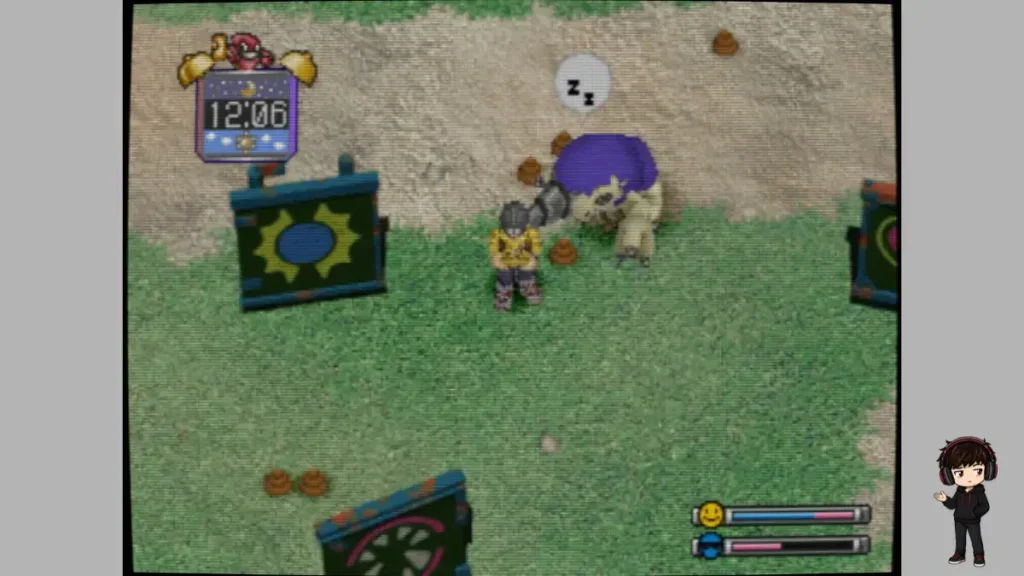
CRTLottes2 is still present in DuckStation’s current ReShade shader bundle, so this is not a zombie entry from an old build. At default, though, the whole image felt softer than I wanted.
The curvature and lighter scanlines were fine. The persistent blur was what kept making me feel as though my eyes needed to refocus. You may rank it much higher if softness is part of the CRT look you want.
I would still choose the original CRT-Lottes over this one.
6. CRT-NewPixie 4/10
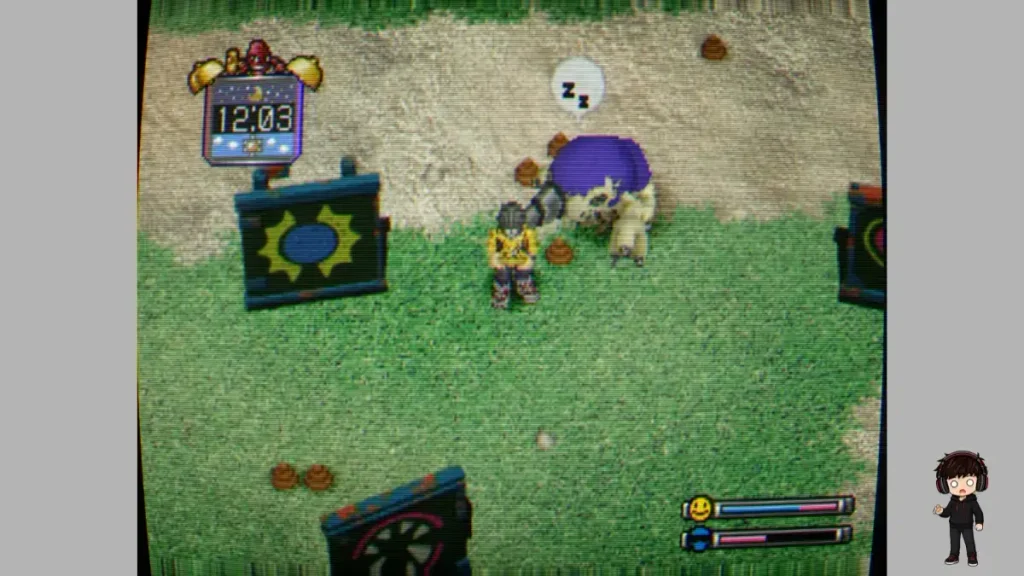
CRT-NewPixie is the maximalist option of this group. The current shader includes controls for blur, curvature, accumulated modulation, a frame image, interference, and rolling scanlines. That explains why so much of the image seems to be moving or changing rather than simply adding a clean scanline pattern.
For a minute it is fascinating. Then the effect becomes the main character. In motion I kept noticing the shader instead of Digimon World, and that was the deal breaker for me.
It is a fun one to experiment with if you want a deliberately rough analog presentation. I would not use the defaults for a long playthrough.
My DuckStation CRT Shader Ranking
Dense scanlines, clear image, best balance for actually playing.
Best if curved glass is a major part of the CRT look you want.
Messier and softer, but closest to an old analog-TV signal in this test.
Very visible scanlines that became tiring at default settings.
A softer alternative whose blur never clicked for me.
Interesting analog effects, but far too distracting for my normal play.
How to Enable CRT Shaders in DuckStation
Current DuckStation builds still keep these under the dedicated Post-Processing settings page.
Enable: Enable Post Processing
Add: choose a shader from the available list
My starting pick: CRT-HYLLIAN
Optional: add more stages to build a shader chain
Tuning: select the shader and adjust its exposed parameters
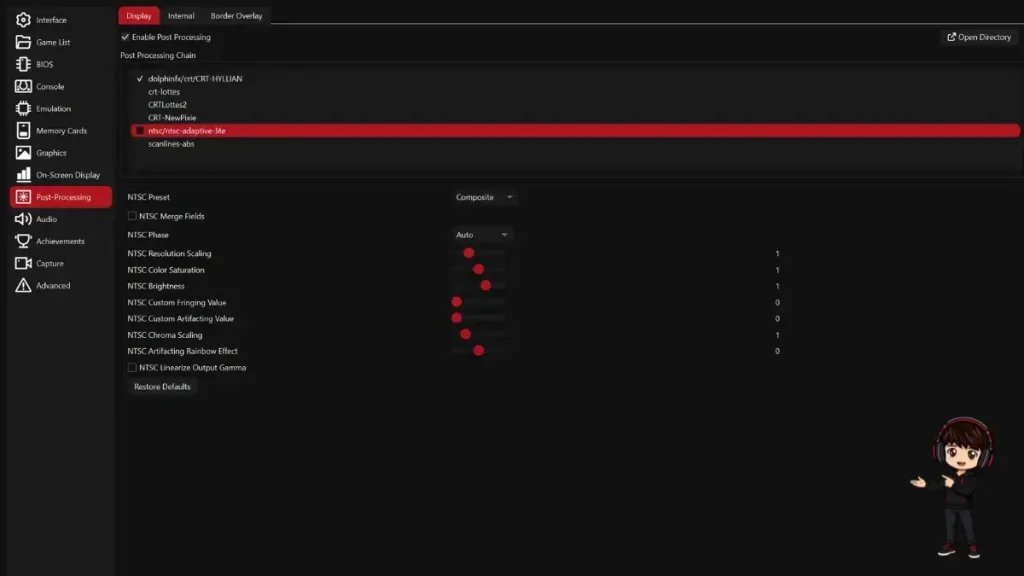
DuckStation explicitly describes Post-Processing as a sequence of filters, and its current interface still has the main enable checkbox plus shader management. That is why a chain such as NTSC Adaptive followed by Scanlines ABS works as a combined effect.
Do not treat my screenshots as fixed presets. Many of these shaders have exposed parameters for brightness, gamma-like behavior, scanline intensity, curvature, masks, blur, or signal characteristics. If HYLLIAN looks too dark on your display, or Lottes curves too much, tune the shader before throwing it into the digital attic.
If you are changing renderers or other graphics settings at the same time, use my DuckStation renderer guide or full settings guide first. It is much easier to judge a shader when the rest of the emulator is already behaving.
Why Your Monitor Matters
CRT shaders can look noticeably different from one modern display to another. Resolution, pixel density, brightness, contrast, panel type, screen size, scaling, and viewing distance all change how visible scanlines and mask patterns become.
That is why the test setup matters. These scores describe what I saw on a 2560×1600 Legion display, not a universal law. HYLLIAN can look denser or lighter on a 1080p monitor, 1440p IPS panel, or 4K OLED.
If the look of a real CRT is the actual goal rather than a shader on a modern panel, my best way to play PS1 games in 2026 guide covers original hardware, CRTs, scalers, and modern displays separately.
DuckStation CRT Shader FAQ
Do you need a CRT TV to use DuckStation CRT shaders?
No. These shaders exist to add CRT-like characteristics to the final image on a modern display. A real CRT already creates its own scan structure, softness, bloom, mask behavior, and analog characteristics, so piling a CRT simulation over a properly connected real CRT usually misses the point.
Should you use 1x Native resolution with CRT shaders?
You do not have to. I used 1x Native because it isolated the shader during this comparison. You can combine higher internal resolution with a CRT shader if you want sharper 3D geometry underneath a more retro final presentation. That hybrid look can be excellent.
Can you adjust DuckStation CRT shader settings?
Yes. Many included shaders expose their own parameters. CRT-HYLLIAN has controls such as scanline and color settings, CRT-Lottes exposes screen warp and mask controls, CRT-NewPixie exposes blur and curvature settings, and Scanlines ABS exposes scanline intensity-related controls. Defaults are only a starting point.
Can you stack multiple shaders in DuckStation?
Yes. DuckStation’s current Post-Processing system runs shader stages in sequence. My NTSC Adaptive + Scanlines ABS result is a two-stage chain rather than one standalone shader.
Do DuckStation CRT shaders hurt performance?
None of these six caused a noticeable performance problem during my original Legion Pro 7i test. That is a result from one machine, not a guarantee for every GPU. More complex shaders and multi-stage chains require additional rendering work, so on a slower system add one shader at a time. If the whole emulator is stuttering even without shaders, use my DuckStation stuttering guide first.
My Recommendation
If you are trying DuckStation CRT shaders for the first time, start with CRT-HYLLIAN at its defaults and play for ten minutes. Do not spend the first hour chasing somebody else’s perfect preset.
If you specifically want curved glass, try CRT-Lottes. If the memory you are chasing is a softer composite-TV image rather than a crisp CRT monitor, try NTSC Adaptive followed by Scanlines ABS.
The best CRT shader is ultimately the one you stop noticing because you are busy playing the game.
The Short Version
CRT-HYLLIAN is still my pick. It gave me the best balance of CRT texture, readable text, and an image I wanted to keep looking at.
CRT-Lottes is the curved-screen alternative. NTSC Adaptive + Scanlines ABS is the softer old-TV option. The rest are worth experimenting with, especially because their parameters can change the experience significantly.
Need the emulator itself sorted first? Start with the DuckStation setup guide.
Related DuckStation Guides
DuckStation Setup Guide 2026 — get the emulator, BIOS, library, controller, and core settings working first.
Best DuckStation Settings for PS1 — the full graphics and performance configuration.
Best DuckStation Renderer — Automatic, Vulkan, Direct3D, OpenGL, and when to switch.
DuckStation Android Setup Guide — the mobile setup is different enough to deserve its own walkthrough.
DuckStation Controller Setup — mapping, Xbox, PlayStation, 8BitDo, and double-input fixes.
Fix DuckStation Stuttering — performance troubleshooting when the game itself is not running smoothly.
DuckStation Keeps Crashing — use this for actual crashes rather than shader preference problems.
Reference note: Current Post-Processing behavior and shader availability were rechecked against DuckStation’s official GitHub repository on August 22, 2026. The repository still contains CRT-HYLLIAN, CRT-Lottes, CRTLottes2, CRT-NewPixie, Scanlines ABS, and NTSC Adaptive, and DuckStation’s current settings UI describes Post-Processing shaders as running sequentially.